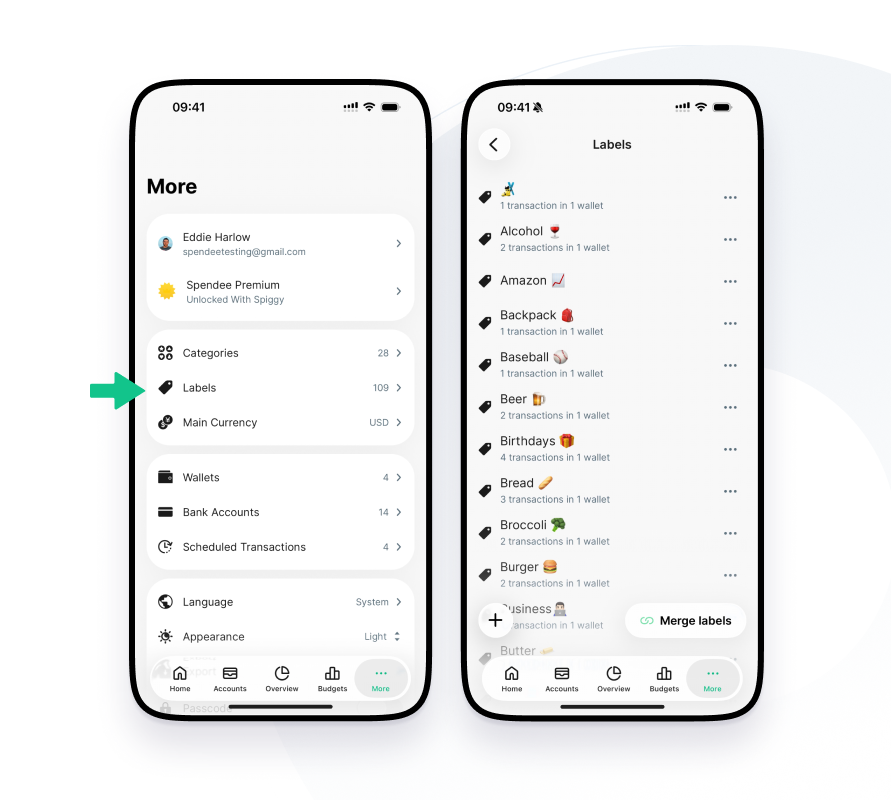
Labels help categorize transactions in a more precise way: it’s fun, it makes your Spendee organized & it helps with better analysis and understanding your finances. When creating a new transaction and determining its value & category, you can easily spot Labels as another option! You can add multiple labels and use them as additional information about the purchase or even as a subcategory.
You can customize your own Labels in the Label Management:
- Open your mobile app
- More
- Labels
- Click on (+)
Labels as Subcategories
Subcategories are one of the most requested features and labels are even better! It basically means adding a label to your category to make it more specific. For example, you can track your Food & Drink expenses and choose labels as “pizza”, “restaurant” or “takeaway”. Now, you’re able to track whatever you’re interested in regarding Food & Drink, your type of food, specific restaurants, or even purchasing behaviors (eating at work, dinner out, or even paying for a date).