









































What are transfers?
A transfer is money that moves between your own wallets and bank accounts. For example, when you withdraw cash from your bank account, or move money from your current account to savings.
How transfers count
Transfers are not counted as income or expenses. In Overview, a transfer between two of your wallets doesn’t change your cash flow. A transfer to or from Out of Spendee does.
How to add a transfer
- Tap the green + button.
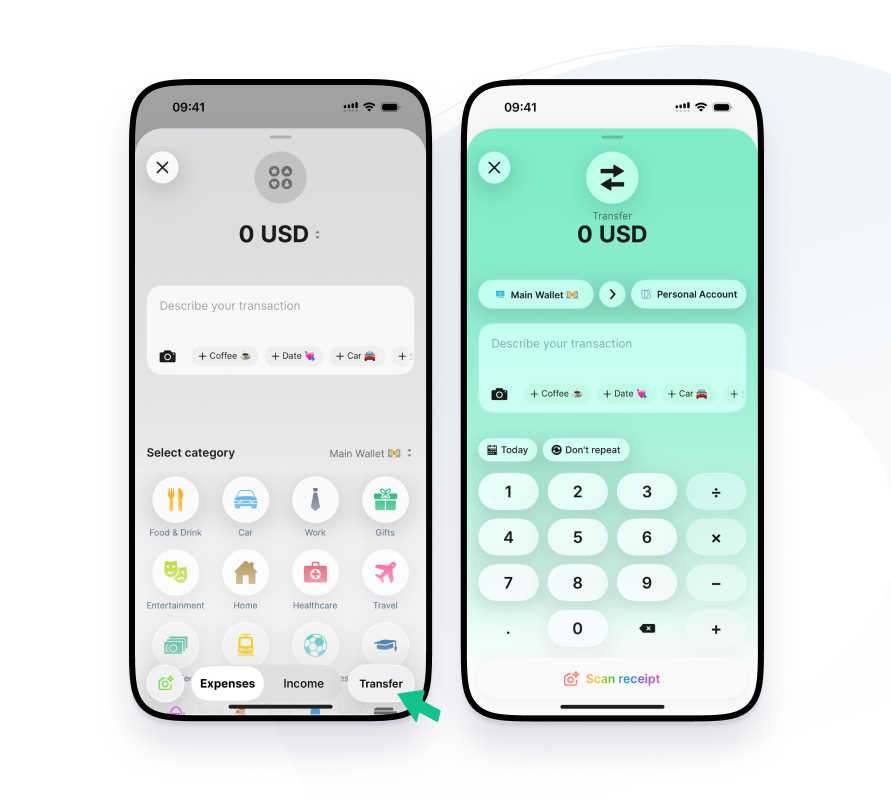
- Tap Transfer at the bottom right, next to Expenses and Income.
- Enter the amount.
- Choose the wallet the money leaves and the wallet it goes to. If the other side is not in Spendee, choose Out of Spendee.
- Add a note, labels, a photo or set it to Repeat if you like.
- Save the transfer.
Transfers with a bank account
When one side of the transfer is a connected bank account, the bank already has that transaction. Spendee looks for it and asks you to pick the matching transaction, the other half of the transfer. If nothing matches in the bank account, the transfer can’t be created.
When the other side is a wallet you add yourself, Spendee can create the other half for you.
Turn a bank transaction into a transfer
- Open the bank transaction.
- Tap the category icon at the top and choose Transfer.
- Answer where the money went or came from: one of your wallets, or Out of Spendee.
- If you choose one of your wallets, pick the matching transaction.
If the payment went to an account that is yours, Spendee can ask whether the account is yours. When you confirm, payments to and from that account become transfers between your accounts.
Automatic pairing
When money moves between two bank accounts you connected to Spendee, Spendee can link both sides as one transfer automatically. You see the other side as Linked transaction in the transaction detail.
Undo a transfer
To break a transfer, open it, tap the category icon and pick an expense or income category instead. Spendee asks what to do with the other half. After that, you can link the transaction again.